The supplier hasn’t listed a price. We can get their current prices and MOQ.
Free quotes from independent agents · supplier checks approx. $5–$100 · 100% refund if not satisfied
The supplier hasn’t listed a price. We can get their current prices and MOQ.
Free quotes from independent agents · supplier checks approx. $5–$100 · 100% refund if not satisfied
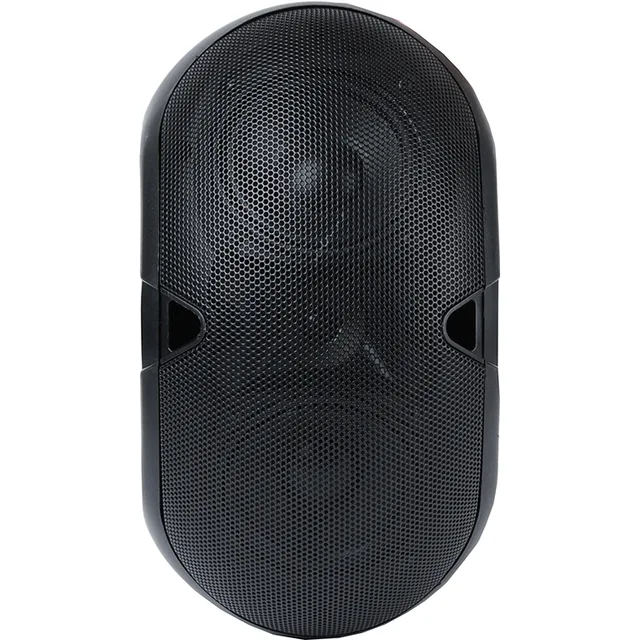
About this product
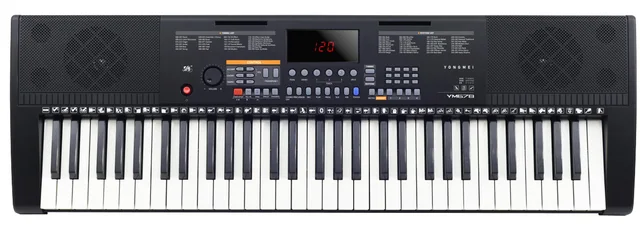
- Materials: Aluminum alloy
- Size: 240*55*260mm
- Color: black
- Exports to: Africa, Middle East, Southeast Asia, South Asia, Central Asia, USA and Canada, Latin America, Russia, EU, Other European Countries, Japan and South Korea, Hong Kong China, Macao China and Taiwan China
About this product
- Materials: Aluminum alloy
- Size: 240*55*260mm
- Color: black
- Exports to: Africa, Middle East, Southeast Asia, South Asia, Central Asia, USA and Canada, Latin America, Russia, EU, Other European Countries, Japan and South Korea, Hong Kong China, Macao China and Taiwan China
Product details
| Materials | Aluminum alloy |
|---|---|
| Size | 240*55*260mm |
| Color | black |
Product details
| Materials | Aluminum alloy |
|---|---|
| Size | 240*55*260mm |
| Color | black |
From the supplier
Constant voltage speaker
connection
It is the type of monophonic system realized in shops, conference rooms, churches and in any place where a
uniform sound reinforcement is necessary, with maximum ease of installation and use. Only 2 wires are
used, starting from the amplifier and getting up to the last speaker. On the amplifier you have to connect a wire
to the “com” (common) terminal and the other wire to the 100V terminal.
The two wires will go all around the installation, and they will be connected to the speakers or rather the
transformers each speaker is equipped with.
BLUETOOTH
This amplifier includes the bluetooth function to receive audio from smartphones and tablets
without using connection cables. To activate the function press the “mode” button (D) on the
multimedia module : the word “BLUE” will appear on the display. Enter the bluetooth setup menu of
your phone and scan for the amplifier to pair it. From this moment on, all the audio from your
phone will be sent to the amplifier.
FM RADIO
Using the mode button select the Radio function. Through the other keys you can
search for the desired radio station. Make sure you have connected the antenna to the FM
socket(19).
MIC 1 SOCKET
6,3mm jack to connect dynamic microphones.
This socket is endowed with priority function to
reduce the other sources’ signal. This function
cannot be disabled.
MIC 2 SOCKET
6,3mm jack to connect dynamic microphones.
This socket is endowed with priority function to
reduce the other sources’ signal. This function
cannot be disabled.
MIC 1
It adjusts the volume’s level of the signal
connected to the MIC1 socket(1).
MIC 2
It adjusts the volume’s level of the signal
connected to the MIC2 socket(2).
AUX 1
It adjusts the volume’s level of the signal
connected to the LINE IN 1 socket.
AUX 2
It adjusts the volume’s level of the signal
connected to the LINE IN 2 socket.
VOL
It adjusts the master output volume.
ON/OFF
MULTIMEDIA MODULE
It offers the possibility to play Mp3 files from
USB/ SD and AUX socket, manage bluetooth
connections and play FM radio.
- POWER SOCKET
Plug here the supplied cable and connect it to a
common 110-230V household power outlet.
- DC POWER
Thanks to these terminals it is possible to
connect or 12V external batteries, to use the
amplifier also on vehicles.
- MUTE
It turns off the volume of all the signals.
It is mainly used by external fixtures to play
high priority or alarm messages.
- COM
Negative pole (-) terminal for speaker
- 4Ω/ 8Ω
Positive pole terminals (+), used along with the
connector COM (16) to connect speakers for 4Ω/
8Ω impedance operation.
- 70V/100V
Positive pole terminals (+), used along with the
connector COM (16), to connect speakers for
70V/ 100V operation.
- OUTPUT SOCKETS (RCA)
They supply a line signal for amplifiers,
recorders or other external fixtures.
- LINE IN 1
RCA sockets to connect line sources (PC, CD,
DVD...)
- LINE IN 2
RCA sockets to connect line sources (PC, CD,
DVD...)
- FM ANT SOCKET
Socket to connect the FM antenna
connection.
From the supplier
Constant voltage speaker
connection
It is the type of monophonic system realized in shops, conference rooms, churches and in any place where a
uniform sound reinforcement is necessary, with maximum ease of installation and use. Only 2 wires are
used, starting from the amplifier and getting up to the last speaker. On the amplifier you have to connect a wire
to the “com” (common) terminal and the other wire to the 100V terminal.
The two wires will go all around the installation, and they will be connected to the speakers or rather the
transformers each speaker is equipped with.
BLUETOOTH
This amplifier includes the bluetooth function to receive audio from smartphones and tablets
without using connection cables. To activate the function press the “mode” button (D) on the
multimedia module : the word “BLUE” will appear on the display. Enter the bluetooth setup menu of
your phone and scan for the amplifier to pair it. From this moment on, all the audio from your
phone will be sent to the amplifier.
FM RADIO
Using the mode button select the Radio function. Through the other keys you can
search for the desired radio station. Make sure you have connected the antenna to the FM
socket(19).
MIC 1 SOCKET
6,3mm jack to connect dynamic microphones.
This socket is endowed with priority function to
reduce the other sources’ signal. This function
cannot be disabled.
MIC 2 SOCKET
6,3mm jack to connect dynamic microphones.
This socket is endowed with priority function to
reduce the other sources’ signal. This function
cannot be disabled.
MIC 1
It adjusts the volume’s level of the signal
connected to the MIC1 socket(1).
MIC 2
It adjusts the volume’s level of the signal
connected to the MIC2 socket(2).
AUX 1
It adjusts the volume’s level of the signal
connected to the LINE IN 1 socket.
AUX 2
It adjusts the volume’s level of the signal
connected to the LINE IN 2 socket.
VOL
It adjusts the master output volume.
ON/OFF
MULTIMEDIA MODULE
It offers the possibility to play Mp3 files from
USB/ SD and AUX socket, manage bluetooth
connections and play FM radio.
- POWER SOCKET
Plug here the supplied cable and connect it to a
common 110-230V household power outlet.
- DC POWER
Thanks to these terminals it is possible to
connect or 12V external batteries, to use the
amplifier also on vehicles.
- MUTE
It turns off the volume of all the signals.
It is mainly used by external fixtures to play
high priority or alarm messages.
- COM
Negative pole (-) terminal for speaker
- 4Ω/ 8Ω
Positive pole terminals (+), used along with the
connector COM (16) to connect speakers for 4Ω/
8Ω impedance operation.
- 70V/100V
Positive pole terminals (+), used along with the
connector COM (16), to connect speakers for
70V/ 100V operation.
- OUTPUT SOCKETS (RCA)
They supply a line signal for amplifiers,
recorders or other external fixtures.
- LINE IN 1
RCA sockets to connect line sources (PC, CD,
DVD...)
- LINE IN 2
RCA sockets to connect line sources (PC, CD,
DVD...)
- FM ANT SOCKET
Socket to connect the FM antenna
connection.
About the supplier
Main products: Other household electric appliance,Other Consumer Electronics and Information Products,Bluetooth speaker,Megaphones,Subwoofer,Amplifier,Portable speaker,Other consumer electronics
- ✓Exhibited at 10 of the last 10 Canton Fairs
- ✓Manufacturer
- ✓Founded 2006
- ✓Canton Fair Premium Supplier
- ✓National high-tech enterprise
Electronics & Appliance exhibitors show in Phase 1 of the Canton Fair, 15 to 19 October 2026.
- Exhibited at 10 of the last 10 Canton Fairs
- Manufacturer
- Founded 2006
- Canton Fair Premium Supplier
More from ZHEJIANGHAOYUAN ELECTRONIC TECHNOLOGY CO.,LTD



Similar products from other suppliers